
JILI77 Deposit – Fast, Smooth, and Error-Free Transactions
Executing a JILI77 Deposit is the crucial first step for players looking to fund their accounts and jump straight into their favorite online games. The platform features an advanced payment gateway engineered to process transactions almost instantaneously while maintaining top-tier encryption. Similar to the efficient process found at JILI77, players can easily transfer funds and start playing within a matter of moments.
Popular JILI77 Deposit Methods
The platform integrates a wide selection of localized payment gateways to provide maximum flexibility for every user. Choosing to complete a JILI77 Deposit through these trusted e-wallets and online channels guarantees maximum convenience.
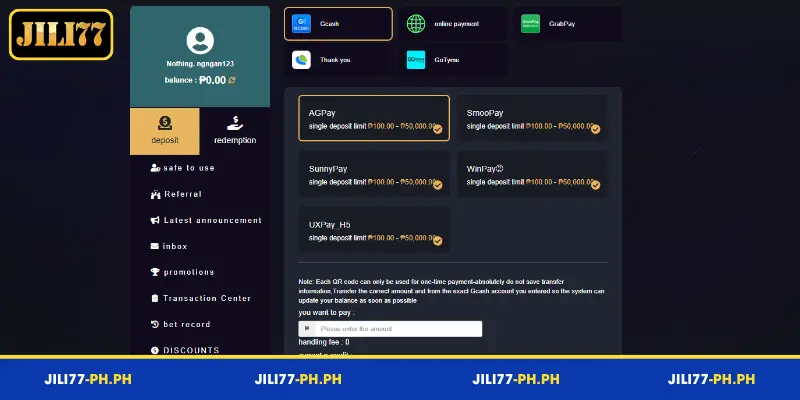
- GCash:The standard mobile wallet in the Philippines, supporting fast transfers ranging from ₱100 to ₱50,000 per single transaction.
- Online payment:A direct online banking channel that delivers rock-solid transaction stability for amounts between ₱300 and ₱50,000.
- GrabPay:An ideal option for Grab app users, offering quick digital wallet payments with limits set from ₱200 to ₱50,000.
- PayMaya (Thank you.):A highly secure e-wallet option (labeled as “Thank you.” in the cashier menu) handling deposits from ₱100 to ₱50,000.
- GoTyme:A modern digital banking integration designed for smooth, reliable fund transfers between ₱100 and ₱50,000.
Step-by-Step Guide to Completing a JILI77 Deposit
To ensure your account funding goes smoothly without encountering any technical delays, simply follow the simple step-by-step instructions outlined below for each method.
Deposit via GCash
GCash is a widely used mobile wallet in the Philippines, allowing users to make digital payments through their smartphones. If this option is available on JILI77, members can follow the steps below to initiate a JILI77 Deposit and verify the transaction before completing the transfer.
- Step 1:Log in to your account and navigate to the cashier or deposit section. Select the GCash icon from the payment methods displayed on the screen.
- Step 2:Choose an available payment gateway, such as AGPay or SmooPay, if either appears in the interface. Enter the amount you intend to transfer and carefully review the payment details provided.
- Step 3:Open your GCash application and scan the generated QR code, if prompted. Verify the recipient information and reference code before authorizing the payment. Keep the transaction receipt for reference and check your account balance afterward.
Transacting via Online Payment
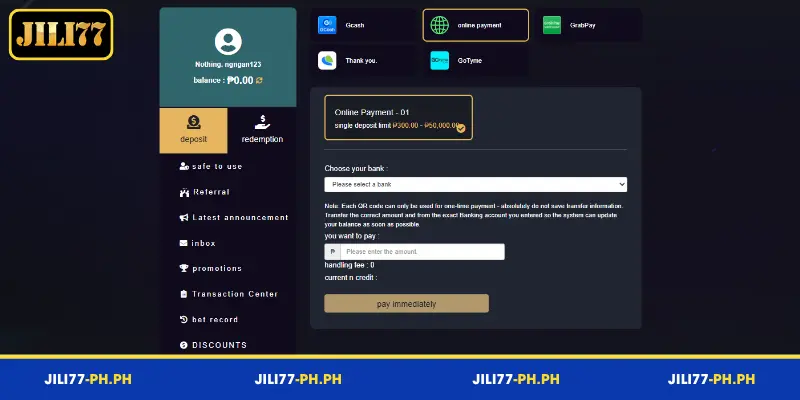
The Online Payment option is designed for users who prefer transferring funds directly from their bank accounts through digital banking services. Before proceeding with a JILI77 Deposit, make sure your bank supports the selected payment route and that your account has sufficient funds to cover the intended transaction.
- Step 1:Open the deposit menu from the main dashboard and select Online Payment. Review the available banking options and choose the institution that matches your account.
- Step 2:Enter the deposit amount within the limits shown on the payment page. The range of ₱300 to ₱50,000 should only be used if it matches the current instructions displayed for your selected method.
- Step 3:Follow the prompts to continue to the relevant banking service, if applicable. Check the recipient details and transfer amount, then authorize the transaction using your bank’s approved verification process. Never share your OTP with another person, and retain the confirmation receipt until the payment status is updated.
JILI77 Deposit via GrabPay
Funding your account with GrabPay allows you to seamlessly use your existing Grab wallet balance for gaming entertainment. Executing a JILI77 Deposit with this method involves three simple actions:
- Step 1:Access the cashier section of your account and look for the GrabPay icon among the listed payment methods. Select it to view the instructions for initiating a transfer.
- Step 2:Enter the amount you wish to deposit and check the minimum and maximum limits shown on the screen. The stated range of ₱200 to ₱50,000 should be verified against the current payment terms before proceeding.
- Step 3:Submit the payment request and follow the displayed instructions to open or access GrabPay. Confirm the recipient information and transaction amount before approving the transfer. Once completed, save the receipt and return to your account to check whether the payment has been recorded.
Procedure for PayMaya
PayMaya (displayed under the “Thank you.” channel header on the deposit screen) offers a reliable and encrypted payment alternative. Follow these steps to complete your deposit:
- Step 1:Select the PayMaya option from the available payment gateway list inside the cashier menu.
- Step 2:Enter the specific amount you wish to add to your balance (min ₱100 / max ₱50,000) and click pay.
- Step 3:Open your PayMaya application to scan the displayed dynamic QR code and authorize the payment.
Executing on GoTyme
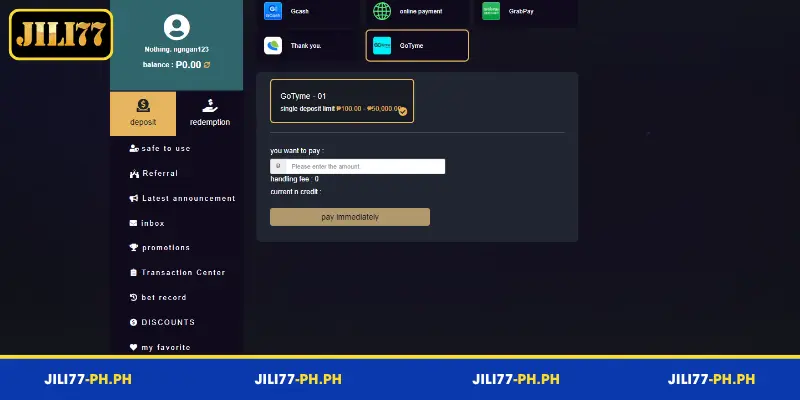
GoTyme digital bank has rapidly gained popularity among active players due to its unmatched stability and rapid settlement times. Follow these steps to complete a JILI77 Deposit using GoTyme:
- Step 1:Choose the GoTyme logo listed among the available payment channels on the cashier page.
- Step 2:Enter your desired funding amount into the required field and submit the payment form.
- Step 3:Save the generated transaction details or QR code, then open your GoTyme app to complete the transfer.
Common JILI77 Deposit Errors and How to Resolve Them
Even though automated payment systems operate smoothly, minor technical issues can occasionally occur. Knowing how to handle these situations ensures your gaming experience remains uninterrupted:
- Entering Incorrect Reference Notes:Failing to input the exact reference note prevents automated crediting. Keep your receipt and contact 24/7 customer support immediately.
- Reusing Expired QR Codes:Every single generated QR code is strictly intended for one-time use only. Never attempt to save or reuse old transaction details.
- Transacting During Banking Maintenance:Transfers initiated during scheduled bank system updates may experience temporary delays. Kindly wait for the maintenance window to finish or switch to an e-wallet.
- Submitting Amounts Outside Allowed Limits:Entering values below the minimum or above the maximum limit triggers an error. Always verify the specific limit of your chosen gateway before initiating a JILI77 Deposit.
Conclusion
Following the correct steps for your JILI77 Deposit guarantees that your money is credited quickly without any technical snags. The wide range of local payment channels ensures a seamless and enjoyable experience every time you log into JILI77. Pick your preferred funding method today to start playing and winning immediately!